
tcp PointCloud Editor
Configuration options - PCE
3.7 Configuration Options
Location
- Ribbon menu
- Home
- OPTIONS
- Configuration (Configuration Options)
Description
This command displays the application's configuration dialog. The different configurable elements are organised in tabs and groups.
General Tab
Application Tab
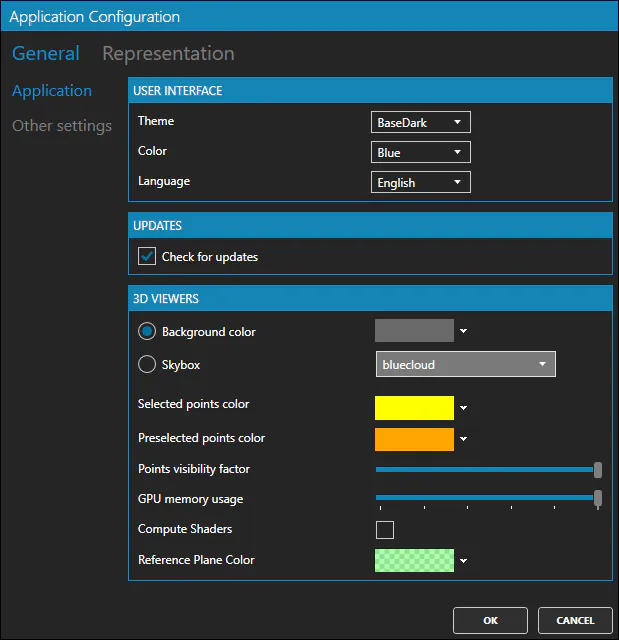
User Interface Group
- Theme
- Color
- Language
Updates Group
- Check for updates
3D Viewers Group
- Background Color
- Skybox
- Selected Points Color
- Preselected Points Color
- Points Visibility Factor
- GPU Memory Usage
- Compute Shaders
- Reference Plane Color
Other Settings Tab
Color Palettes Group
- Palettes
Video Recording Group
- Render Logo
Representation Tab
Point Clouds Tab
Representation Color Group
- Point Cloud Color
- Elevation
- RGB Color
- Intensity
- Category
- Time
- Return Type
Visual Effects Group
- Eye Dome Lighting
Grids Tab
Representation Mode Group
- Edges Only
- Faces Only
- Edges & Faces
- Linewidth
Representation Color Group
- Model
- Elevation
- Slope
- Slope Direction
Visual Effects Group
- Illumination
- Contours
Surfaces Tab
Representation Mode Group
- Edges Only
- Faces Only
- Edges & Faces
- Linewidth
Representation Color Group
- Model
- Elevation
- Slope
- Slope Direction
Visual Effects Group
- Illumination
- Contours
Volumes Tab
Representation Mode Group
- Edges Only
- Faces Only
- Edges & Faces
- Linewidth
- Cut Visible
- Fill Visible
Representation Color Group
- Model
- Volume
Visual Effects Group
- Illumination
Models 3D Tab
Representation Mode Group
- Edges Only
- Faces Only
- Edges & Faces
- Linewidth
Visual Effects Group
- Illumination
Points Tab
Control Points Group
- Foreground Color
- Background Color
- Text Size
Binded Points Group
- Foreground Color
- Background Color
- Text Size
User Points Group
- Foreground Color
- Background Color
- Text Size
Pano Imagery Tab
Pano Imagery Group
- Sphere Color
- Sphere Outline Color
- Sphere Size