
tcpTunnel CAD
License activation - TNC3
1.3 License activation
To activate the license for TcpTunnel CAD, it will be necessary Internet connection during the first execution of the program.
There are 3 types of license, DEMO (30 days), FINAL (permanent), 365 (annual). For these last two licenses, it will be necessary to enter an activation code of 20 and 16 characters, respectively.
The next steps must be followed:
-
Run CAD program (AutoCAD or ZWCAD).
-
Run TcpTunnel > About command.
-
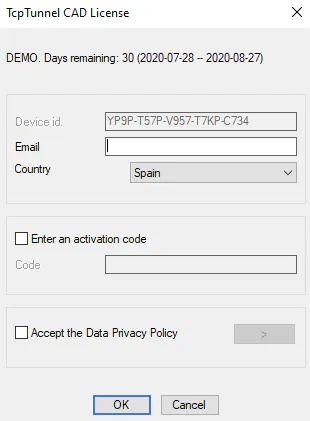
Enter the Email, the Country and enable the check box Accept the Data Privacy Policy.
-
For FINAL or 365 license, enable the option Enter an activation code and write, on Code edit box, the activation code supplied.
-
Click OK button to start the activation process.