
tcp PointCloud Editor
Manual software license transfer - PCE
6.2 Manual software license transfer
This method is useful if automatic transfer is not possible due to security controls and/or restrictions on the internet connection.
The RUS_APLITOP.exe application is used, located in the Driver directory of the installation of TCP-PointCloud Editor (by default, C:\Program Files\Aplitop\TCP PointCloud Editor\Drivers\).
The process consists of three steps:
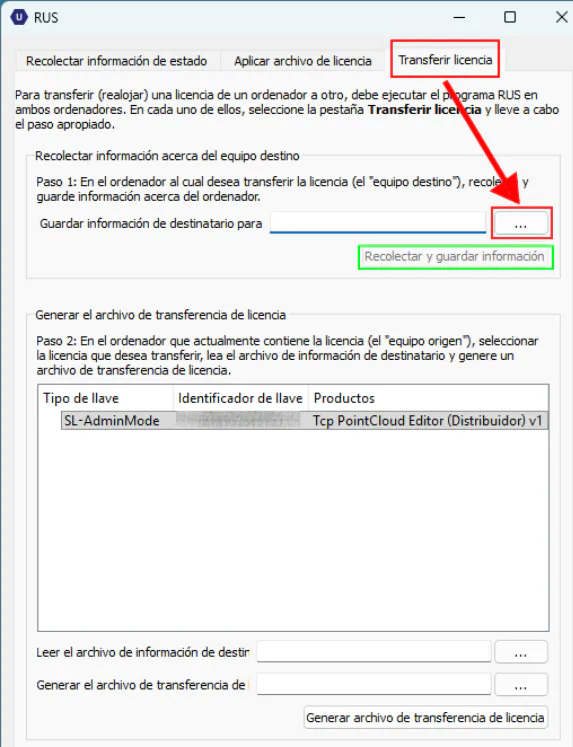
Step 1: Gather information about the target computer (on the new PC):
- Run the RUS_APLITOP.exe application.
- Select the Transfer License section.
- In the Collect information about the target computer box, click the [...] button and choose a file name to save this information (this file will be the 'fingerprint' of the new PC).
- Click Collect and save information to save the file.
Step 2: Generate the transfer file (on the PC with the licence installed):
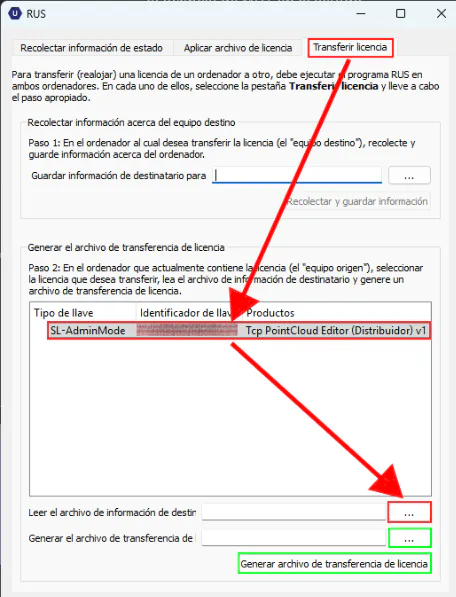
- Run the RUS_APLITOP.exe application, also in the Transfer Licence section.
- In the Generate license transfer file box, select the line with the license for TCP-PointCloud Editor in the list.
- Use the first button [...] to select the file generated in step 1, the fingerprint of the new PC.
- Use the second button [...] to specify a destination for the file where the license will be exported (this will be the transfer file).
- Finally, click Generate transfer file.
Important: Once this step is complete, the licence will no longer be available on this original computer and can only be started on the new PC.
Step 3: Apply the licence file (again on the new PC):
- Run the RUS_APLITOP.exe again.
- This time, go to the Apply Licence File section..
- Press the [...], upload the file generated in Step 2, the transfer file.
- Press Apply update.
By following these steps, the TcpPointCloud Editor license will have been successfully transferred from one computer to another. If you encounter any problems during the process, please consult our help section or contact us using the form on the https://private.aplitop.com/support/form page.