
tcp PointCloud Editor
Create surface - PCE
10.2 Create Surface
Location
- Ribbon menu
- Modeling
- MODELS
- Create (Create Surface)
Description
This command allows you to create a surface (Triangulated Irregular Network), from the project's active point clouds or triangulate 3D polylines. This command will ignore all the points that belongs to a non-triangulable class.
Parameters
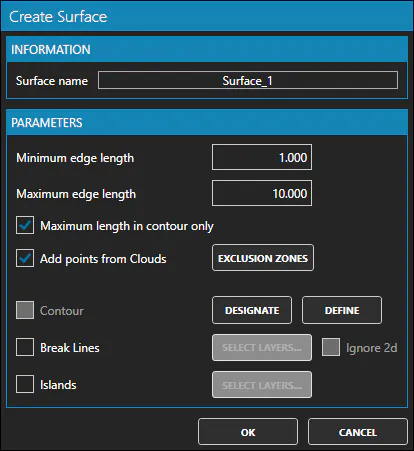
| Name | Meaning |
|---|---|
| Surface Name | Name of the resulting surface. |
| Minimum edge length | Minimum distance between points in the triangulation. |
| Maximum edge length | Maximum distance between two points connected by a triangle edge. Can be restricted to contour edges |
| Maximum length in contour only | If true, maximum edge length will be applied only to contour edges |
| Add points from Clouds | If true, it will insert points from the point clouds into the triangulation |
| Exclusion zones | Allows to select a set of layers with closed contours (closed polylines). All points contained within those contours will be ignored |
| Contour | Allows to restrict the grid to a user-defined region. |
| Break Lines | Allows to select a set of layers with 3D polylines to use as break lines. The break lines have a clean-up distance at left and right to ignore points that are close to the breaklines |
| Islands | Allows to select a set of layers with closed contours (closed polylines). All triangles within the contours will be removed and the contour itself inserted as breakline |
Use cases
-
Computing a Digital Terrain Model (DTM) from a point cloud
-
Computing a Digital Surface Model (DSM) from a point cloud
-
Triangulating 3D polylines