
tcpGPS
Distance meters - GPS v2
3.2 Distance meters
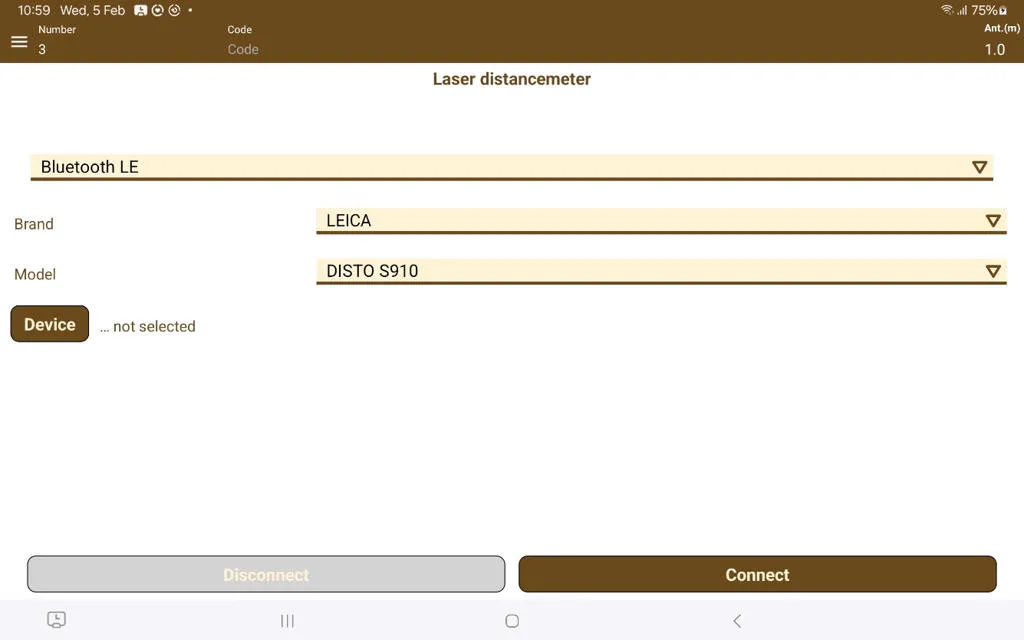
Accessing the menu screen and selecting Devices > Distance meter, it's possible to access the distance meter device connection screen, which works via Bluetooth.
 |
|---|
Figure 17. Distance meter connection screen |
To connect a laser distance meter, the correct Bluetooth connection type, the brand and model must be chosen, which matches that of the distance meter that is going to be used. Afterwards, pressing the "Device" button will show a list of Bluetooth devices that the mobile phone or tablet can detect. Once the distance meter appears in the list, it can be selected by touching it in the list to save the selection.
If it does not appear in the list, it's necessary to pair it manually in the Bluetooth section of the operating system.
Connecting a laser distance meter allows the performing of distance measuring in COGO tools using the distance meter. Pressing the  button in a COGO tool with the distance meter connected allows the collection of laser measurements.