
tcpGPS
Status toolbar - GPS v2
5.2 Status toolbar
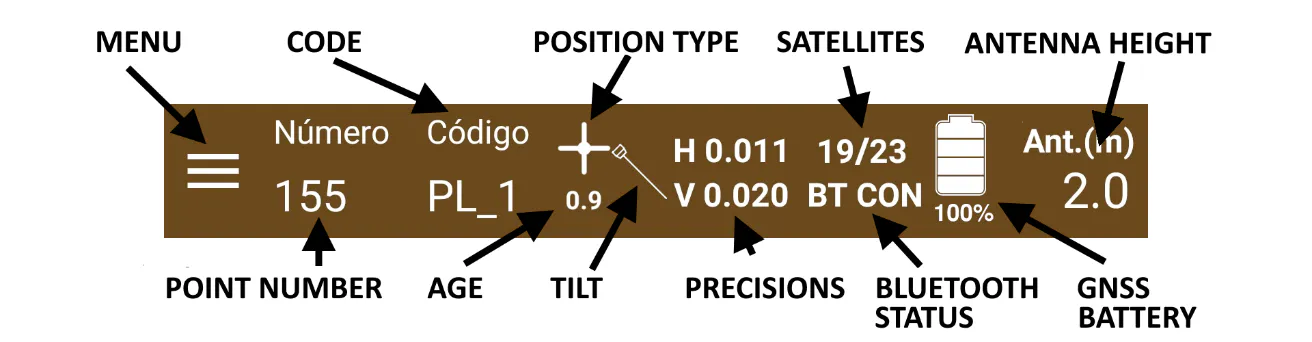
In the status bar you have access to the Application Menu, as well as to the information on the current status of the receiver that is being used. In Figure 35 you can see in detail the content of the menu bar.
 |
|---|
Figure 35. Status toolbar |
Application menu: Described above, it gives access to the different templates of the application.
Antenna height: Set the antenna height in the project (meters).
Type of position: Position that the GPS is currently capturing. It can be:
 | Fixed |
 | Floating |
| Autonomous |

Age: It refers to the age in real time, in seconds. The latency of the corrections that are received from the reference base.
Tilt: Those receivers where tilt option is supported, this icon will show the status of it. The possible icons are:
 | Tilt not connected or error. |
 | Need to calibrate. Please, follow the steps provided by the manufacturer. |
| Keep the receiver vertical. |
| Tilt limit exceeded. |
| Ready for measurement. |


Precisions: The vertical and horizontal precisions in which the receiver is currently working in, in meters.
Battery: Those receivers whose battery state is supported, it will be shown here together the remaining charge.
Satellites: Number of satellites currently used to perform the measurements.
Bluetooth status: Icon that shows the current status of the Bluetooth connection to the external receiver (if this receiver option is being used). The following messages are used for describing the status of the Bluetooth:
BT ICX: Initializing connection.
BT CRC: Creating connection.
BT CTN: Connecting with GNSS.
BT CON: Connected to GNSS.
BT ND: No data from receiver.
BT EC1: Connection error 1.
BT EC2: Connection error 2.
BT DSN: Disconnecting from receiver.
BT CLC: Closing connection.
BT DSC: Disconnected from receiver.
BT EXC: Connection exception.
BT EXD: Disconnection exception.