
tcpScancyr
Cross sections comparisons - TNSB3
13.1 Cross Sections Comparisons
You can compare two cross sections files; both files should be included in the project.
The following dialog box will appear:
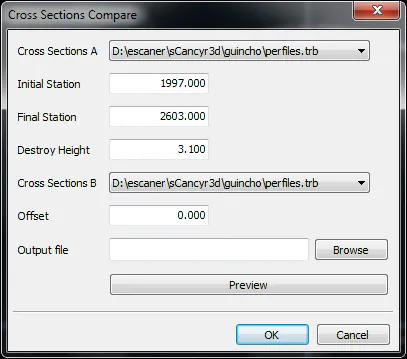
You will need to specify two cross sections files, the station range will be taken from the first cross sections file. You may also set the benching height and a offset (positive outwards, negative inwards) for the second cross sections file.
By clicking on "Preview", an Export Cross Sections dialog box will open, allowing you to configure the fields you wish to export. Accepting the dialog box will create a preview of the cross sections comparison.
Accepting the dialog box will also show a report outlining the surface and volume differences between cross sections A and B.