
tcpScancyr
Horizontal alignment - TNSB3
27.3 Horizontal Alignment
Allows one to change the colors and distances of the short and long marks, as well as the color of the unique points.
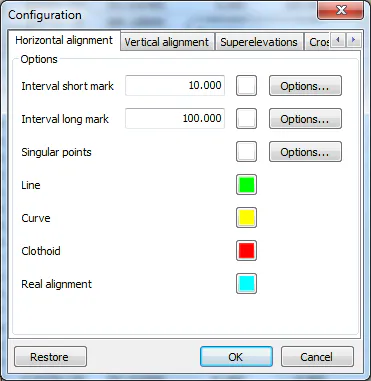
Figure 88 - Alignment Configuration
Short mark interval: The distance in meters between the short marks. Alongside is an icon for assigning them a different color. The "Options" icon can be used to configure the format of the marks.
Long mark interval: The distance in meters between the short marks. The mark color and format can also be configured.
Singular points: Only the color and format of the unique points can be configured.
Line, Curve, Clothoid: The color of each type of alignment section.
Real alignment: The color of the alignment calculated with cross sections and sections.
- Format of the marks and unique points.
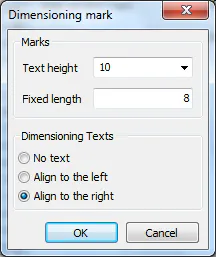
Figure 89 - Format of the Short and Long Marks
Mark length: Length of the mark. The line will be perpendicular to the alignment.
Extension length: If one draws texts, this value marks the extension of the mark towards the attached text.
Align texts: Texts can be aligned to the left, the right or not aligned at all.
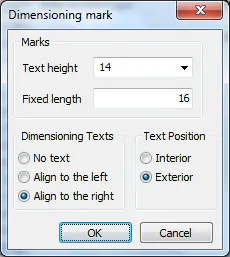
Figure 90 - Format of Unique Points
The options available for the unique points are the same as for the short and long marks. One can also indicate if the text is inside or outside.