
tcpScancyr
Manual section input - TNSB3
11.4 Manual Section Input
It is also possible to include a template by writing the coordinates and the radii of each vertex. In order to access the numerical input window, use the "Numerical editing of the section" icon.
The numerical input window is divided into two parts - in the upper area there is a toolbar whose use is the same as in other areas of the application.
Below the icons there is a table which allows us to fill in data. If a row has a radius other than zero, it will form an arc from this point to the point in the following row. If it is the last row, it will be linked to the first vertex. The final column shows the section type.
All sections should have the vertexes in the clockwise direction, and should also be closed. This means that the program will always join the last point to the first one, and the last point does not have to be the same as the first one.
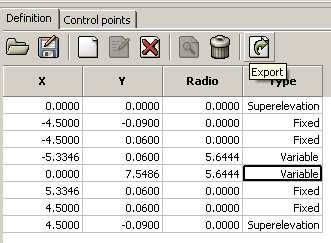
Figure 50 - Section Numerical Input