
tcpTunnel
Cross sections - TNL5
9.1 Cross-Sections
Shows any differences existing between the tunnel's measured points and theoretical tunnel template.
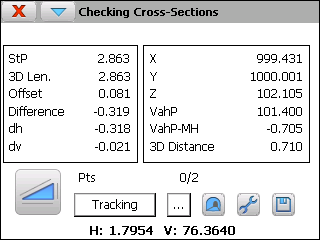
The following information is provided:
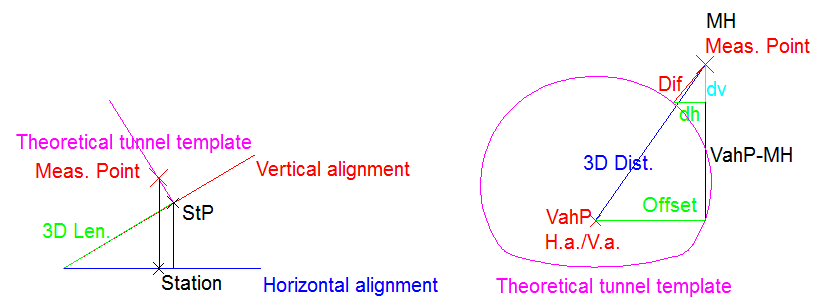
StP, Station of the profile of the point measured
3D Length calculated from the initial station of vertical alignment.
Offset regard with the horizontal alignment
Difference regard with the tunnel's theoretical cross-section
Horizontal (dh) and vertical (dv) differences between measured point and the point regard with theoretical tunnel template
X, Y, Z coordinates of the point measured
The vertical alignment height (VahP) at StP
The difference between vertical alignment height at StP and the measured height (VahP - MH)
3D Distance between the measured point and the point calculated over horizontal alignment at StP
Pts, number of points stored and measured.
Also allows one to select a point from file click on  button.
Each point measured can be recorded and viewed.
Tracking button enables this operation mode on total station and it allows to analyze points constant. Also these points are drawn in graphic mode. It's possible to store the points in the current file while this measurement method is activated.
The point drawing shows the theoretical tunnel template calculated for the last measured station as well as all measured points which their calculated StP are within the interval [LastMeasuredStation -- StationTolerance, LastMeasuredStation + StationTolerance]. The station tolerance is set up within the option Settings > Tolerances and also it can be accessed through the Tolerances option within the menu of the title bar.
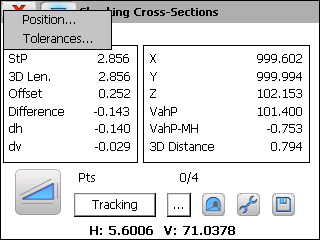
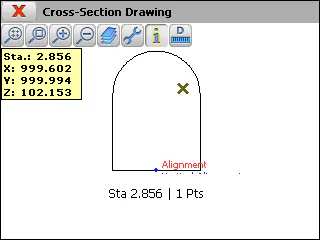
When click on information button and select a measured point, the program shows the station and the coordinates X, Y, Z of that point and, also, the total station rotates to that point.
This option also allows to rotate the total station to a theoretical point of the cross-section on a entered station for checking this point. For doing that, you must select the Position option within the menu of the title bar.
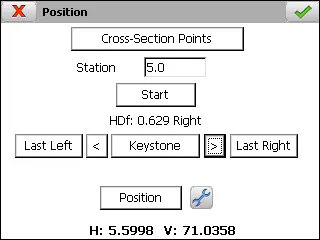
To define the theoretical points into which the tunnel template is divided, the user must enter the theoretical station and click on Cross-Section Points button (see Features and Functionality > Theoretical Points of the Tunnel Template).
Once the data has been entered, the Start button should be clicked in order to position the station on any of the points calculated.
To change point, use the Last Left < Keystone > Last Right buttons.
When one presses Position button, the total station will move to the selected point. Then, when clicking on accept button, the total station will make a measurement for checking the point.