
Support
Where can I download the tcpMDT manuals?
The manuals are downloaded to your computer during program installation. You can access them from the Start menu.
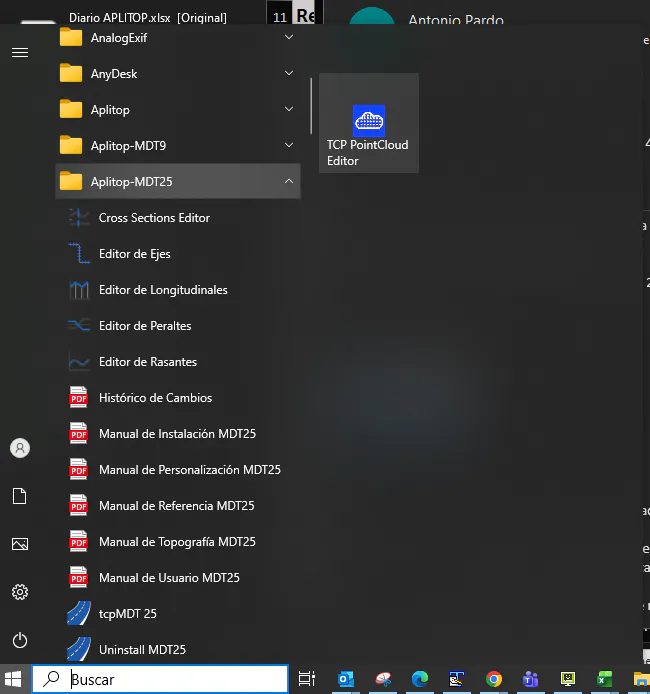
Where the installed manuals are kept
The manuals are installed automatically together with the application —unless that option was unchecked during installation— and are kept in the Doc subfolder of the program installation directory, as PDF files ready to print: user, installation, reference and customisation.
The path follows the pattern C:\Program Files (x86)\Aplitop\<version>\Doc:
MDT 9:
C:\Program Files (x86)\Aplitop\MDT9\DocMDT 25:
C:\Program Files (x86)\Aplitop\MDT25\DocMDT 26:
C:\Program Files (x86)\Aplitop\MDT26\Doc
The folder is named after your version, so replace MDT26 with the one you have installed. The procedure is the same in MDT 9, MDT 25 and MDT 26: only that folder changes.
Getting the updated manuals or downloading them again
If you unchecked the installation of the manuals, or you want the most recent version, consult the documentation directly on the Aplitop public website: www.aplitop.com.
If you cannot find the Doc folder
The installation of the manuals was most likely unchecked. Get them from the Aplitop website, or run the installation again without unchecking that option.
If you need any other manual that you cannot find, contact APLITOP technical support.