
tcp PointCloud Editor
Coplanar cuts - PCE
9.13 Coplanar Cuts
Location
- Ribbon menu
- Alignments and Profiles
- PROFILES
- Coplanar Cuts
Description
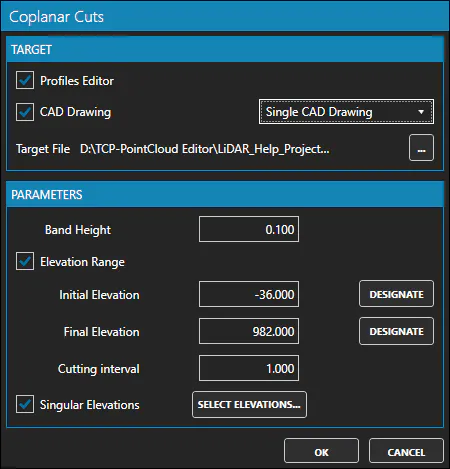
This command shows the Coplanar Cuts dialg, to generate coplanar cuts of points from point clouds.
Parameters
| Name | Meaning |
|---|---|
| Profiles Editor | Check to open the Profiles Editor after the command is executed |
| CAD Drawing | Check to create one or multiple CAD drawings with the generated coplanar cuts |
| Target File | The target file where the coplanar cuts will be saved (single drawing) |
| Target Folder | The target folder where the coplanar cuts will be saved (multiple drawings) |
| File Prefix | The prefix of the file names of the coplanar cuts (multiple drawings) |
| File Format | The file format of the drawings (multiple drawings) |
| Band Height | The height of the band for each cut |
| Elevation Range | Checked to set the elevations range for the cuts |
| Initial Elevation | The minimum elevation for the cuts |
| Final Elevation | The maximum elevation for the cuts |
| Cutting Interval | The step between the elevations of the cuts |
| Singular Elevations | Checked to set the singular elevations for the cuts |
By clicking the "SELECT ELEVATIONS" button, the Select Elevations dialog will be shown.
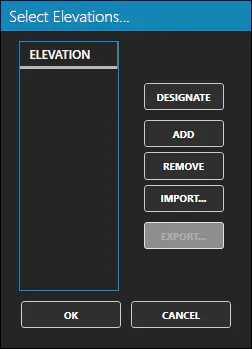
With this dialog you can set several elevations for the cuts (custom elevations). Is something similar to singular points in alignments.
Remarks
- The command is only available when there is at least one active point cloud.