
tcp PointCloud Editor
Quick profile parameters - PCE
9.12 Quick Profile Parameters
Location
- Ribbon menu
- Alignments and Profiles
- PROFILES
- Configuration (Quick Profile Parameters)
Description
This command shows the Quick Profile Parameters dialog, which allows setting quick profile calculation parameters.
Parameters
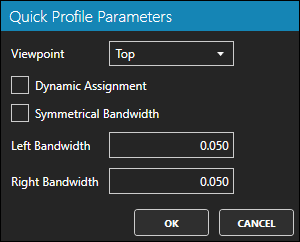
| Name | Meaning |
|---|---|
| Viewpoint | The orthogonal viewpoint from which the profile will be generated |
| Dynamic Assignment | If checked, the user should set the left and right bandwidths graphically |
| Symmetrical Bandwidth | If checked, the left and right bandwidths will be the same |
| Left Bandwidth | The left bandwidth of the profile |
| Right Bandwidth | The right bandwidth of the profile |
Remarks
- If you accept the parameters, the Quick Profile command will be launched, using the parameters you set.