
tcp PointCloud Editor
Cross sections - PCE
9.8 Cross Sections
Location
- Ribbon menu
- Alignments and Profiles
- PROFILES
- Cross Sections
Description
This command generates cross-sectional profiles of points from the selected alignment.
Parameters
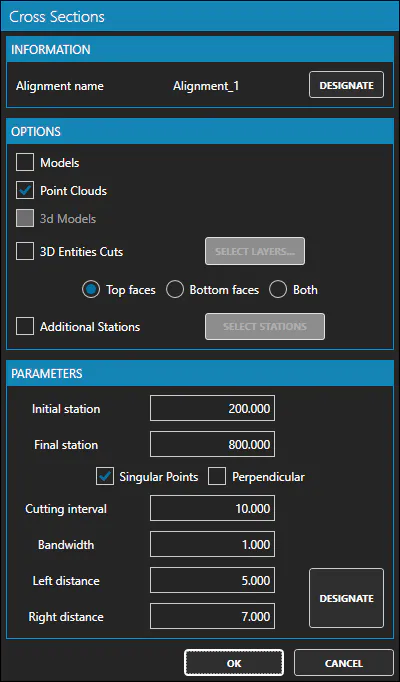
| Name | Meaning |
|---|---|
| Models | Checked if you want to use grids and surfaces for the generation of profiles |
| Point Clouds | Checked if you want to use point clouds for the generation of profiles |
| 3D Models | Checked if you want to use 3D models for the generation of profiles |
| 3D Entities Cuts | Checked if you want to use 3D entities for the generation of profiles |
| Additional Stations | Checked if you want to add additional stations to the cross sections |
| Initial Station | The initial station of the cross sections |
| Final Station | The final station of the cross sections |
| Singular Points | Checked if you want to set singular points for the cross sections |
| Perpendicular | Checked if cuts are perpendicular to the vertical alignment |
| Cutting Interval | The interval between the stations of the cross sections |
| Bandwidth | The width of the band for the cuts |
| Left Distance | Length of the left side of the cuts with respect to the alignment |
| Right Distance | Length of the right side of the cuts with respect to the alignment |
Remarks
-
An alignment must be selected to use this command.
-
Once the cross sections are generated, the CrossSection Editor will be shown.