
tcpMDT
Transform drawing - MDT25
28.11 Transform Drawing
This command allows you to apply a transformation to entities in the current drawing. First request an NTR file, and then the following dialog is displayed:
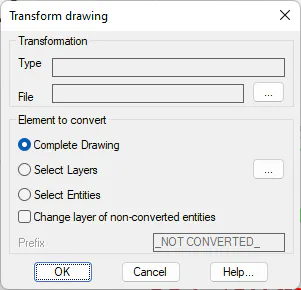
Type. The type of transformation of the selected file.
File. The name of the transformation file.
Elements to convert
Complete drawing. If this option is selected, you will try to apply the transformation to all draft entities.
Select Layers. This option allows you to select the layers to whose features the transformation will be applied.
Select Entities. If this possibility is chosen, after pressing the OK button, the designation of the entities to be transformed will be requested.
Change layer of non-converted features. If this check box is selected, features in the drawing that could not be converted are changed to a layer whose name will be the original preceding the value of the Prefix check box.