
tcpMDT
Filter mesh - MDT25
5.8 Filter Mesh
This command is used to filter or generalize a mesh in order to reduce its size. This is useful when a mesh is too large to be represented with CAD.
When this command is executed, the window below appears to configure the filtering.
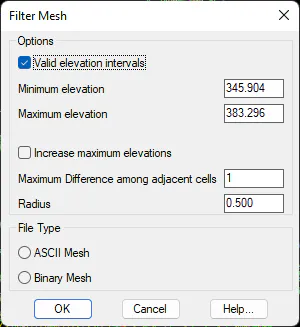
Valid elevation intervals: Indicate the elevations for the new mesh, meaning any cell with a lesser or greater elevation will be eliminated from the mesh.
Increase maximum elevations: this filter is to eliminate contiguous cells between which the elevation disparity is greater than the parameter given.
Maximum difference among adjacent cells: Indicates the maximum difference that can exist between two adjacent cells.
Radius: Radius in which the analysis is conducted, meaning that from each one of the cells all the cells that are contained in the indicated radius are analyzed.
File Type: We indicate the type of file to work with, meaning with binary or ASCII meshes.