
tcpMDT
[PRO] draw sheets - MDT25
22.1 [PRO] Draw Sheets

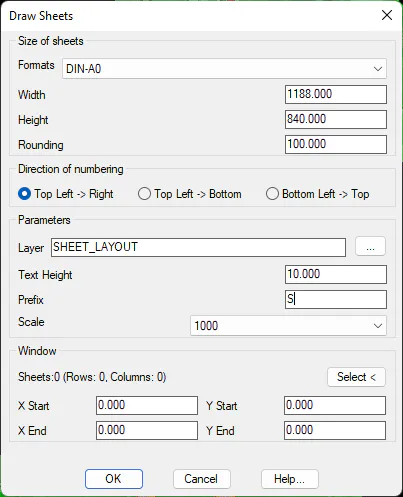
With this command you can draw an array of sheets, in order to use them with the Split Drawing and Save Sheets commands. The command displays the following dialog:
Size of Sheets
Formats. List of formats available in the file "hojas.dat", in the configuration directory of the program. Changing the format modifies the Width and Height of the sheets to be drawn.
Width. Horizontal size of the sheet. You can edit this value if you want a value that is not included in the format list.
Height. Vertical size of the sheet. You can edit this value if you want a value that is not included in the format list.
Rounding: The rounding factor of the initial drawing coordinates.
Direction of numbering
In the automatic numbering of the sheets, the order in which it is performed.
-
Top Left > Right
-
Top Left > Bottom
-
Bottom Left > Top
Parameters
Layer: Layer on which sheets are drawn.
Text Height. The size of the text that is drawn when you create the sheets.
Prefix. The program numbers the sheets from top to bottom, from left to right. The text that is drawn when creating the sheets consists of the prefix indicated in the dialog, followed by the sheet number. this text is used to name each of the files created with the save sheets command
Scale. Before applying the command, the parameters are multiplied by the scale value and divided by 1000. In this way, changing the scale modifies all the parameters.
Window
Selection of the window or area in which the sheet formats will be drawn automatically. The \'X Start\' and \'Y Start\' parameters will be automatically updated.
Additionally, the estimated number of rows and columns will be calculated.
Once the parameters are confirmed, the program asks that the two points that define the window where the sheets are to be drawn be designated, after which the necessary sheets will be drawn to cover the window. Only sheets containing some entity of the drawing will be drawn.
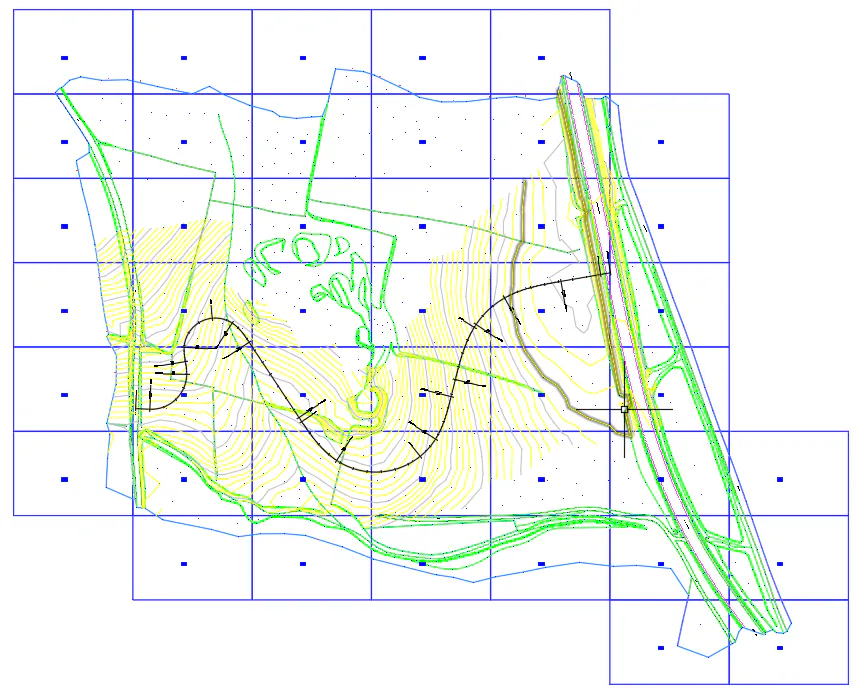
In case the drawn matrix has any extra sheet, you can delete the polyline with the CAD directly and run the Number Sheets command to renumber the sheets.