
tcpMDT
[PRO] Create Paper Space Layouts - MDT26
 | Command to execute in the CAD |
|---|---|
Vertical menu | MDT26 > Sheets > Create Paper-Space Layouts |
Ribbon menu | Utilities > Sheets > Create Layouts |
Command line |

Create Paper-space Layouts
This command creates a paper space layout for each of the existing sheets in the drawing. For this option, it is not necessary to previously run the Split Drawing command. Each presentation will be assigned the name of the corresponding sheet.
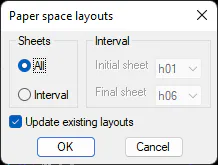
Sheets : indicates if we want to create presentation of all the sheets or of a certain interval.
Interval: In the case of selecting Interval, we indicate the Initial Sheet and the Final Sheet.
Update existing layouts: If any presentation exists, if this option is enabled, they will be overwritten. In the event that it is disabled, the sheets will not be created.