
tcpTunnel CAD
Settings - TNC3
14.2 Settings
In the upper right corner of the window there is a Settings button. Clicking on it will display the following dialog:
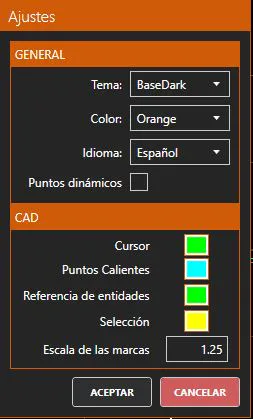
General
Theme: Defines the visual appearance of the application. By default it is set to BaseDark, giving the application dark backgrounds and light text. The alternative value is BaseLight, which reverses the color scheme: light backgrounds and dark text.
Color: Defines the color palette used by the application. By default it appears in orange (Orange). A variety of possible colors are offered.
Language: Allows one to select the application language.
Editor
Dynamic points: If enabled, the points from the reference .trs file are shown dynamically in the CAD viewer as the user navigates between stations, always displaying the points corresponding to the current station.
CAD
Cursor: Sets the cursor color in the CAD viewer. This cursor is only visible when there is an active editing command.
Hot points: Sets the color of the hot points of the selected entities in the CAD viewer.
Entity reference: Sets the color of the entity reference marks on the CAD viewer when in an operation that uses those references.
Selection: Sets the color of the selected vertices of an entity in the CAD viewer.
Mark scale: Sets the size scale for the CAD viewer marks: hot points and entity references.
Once the dialog is accepted, the configuration is applied and remembered for future program executions.