
tcpTunnel Scan
Survey - TSCAN1
9.3 Survey
In this section, the user can set up several parameters regarding with survey and set out data.
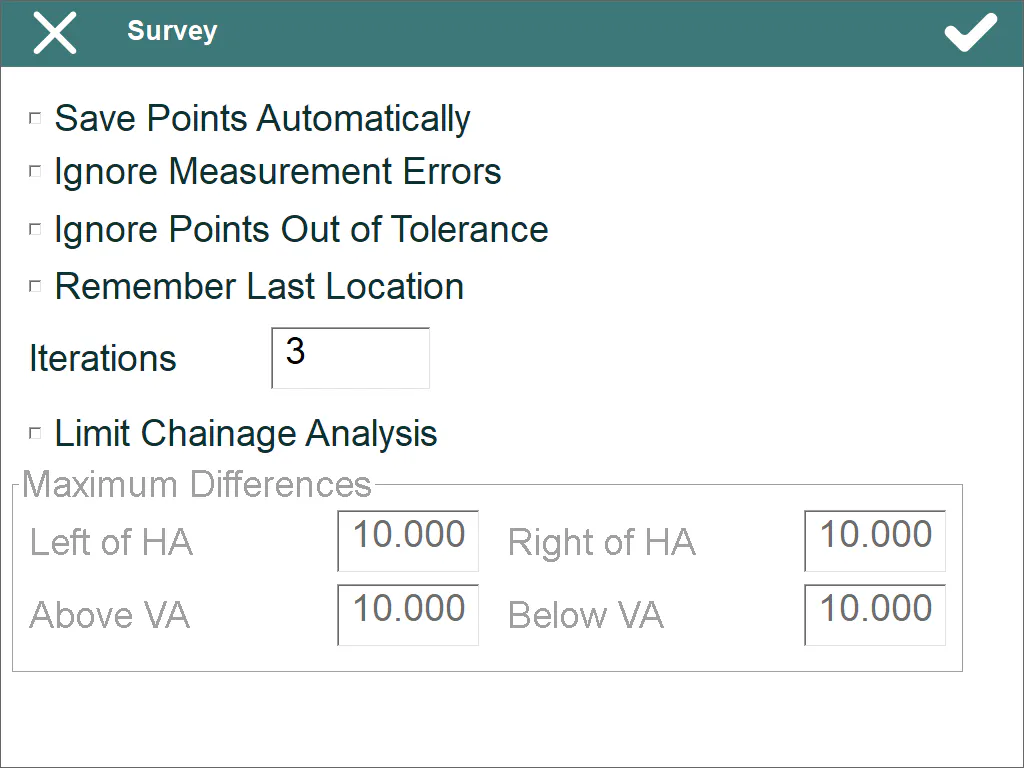
Save Points Automatically: Each measured point within Survey > Point and Checking > Cross sections options will be stored automatically after measuring it, otherwise, several measurements can be done without stored the point.
Ignore Measurement Errors: Allows one to set out and survey cross-sections without inform about measurement and rotation errors of the total station. When an error occurs, the program continues with the next iteration or point.
Ignore Points Out of Tolerance: Within setting out and surveying cross-sections options, the program won't ask about storing the point if the station difference is bigger than setting tolerance.
Remember Last Location: This option is used also within setting out and surveying cross-sections and it allows one to calculate a new point using the last difference calculated regarding with tunnel template.
Iterations: Set up the number of iterations that the program does, when setting out or surveying, for trying to meet the setting tolerances. This parameter is used within setting out the front and setting out and surveying cross-sections.
Limit Chainage Analysis: This option allows one to enable/disable the limits for analysing stations. This feature is useful for spiral horizontal alignments. The program ask for maximum distances to the left and right of the horizontal alignment and up and down of the vertical alignment.
For each point, the program will calculate several solutions along the horizontal alignment and, then, it select the first station where the point is below the stablished distances.