
tcp PointCloud Editor
SLAM route viewer - PCE
14.4 SLAM Route Viewer
Description
The SLAM route viewer is available when the project contains at least one SLAM route.
To start the viewer, simply right-click on one of the routes in the project elements panel and select the option ‘Show SLAM route’ or ‘Show closest waypoint’ and click on a point in the main viewer.
Details
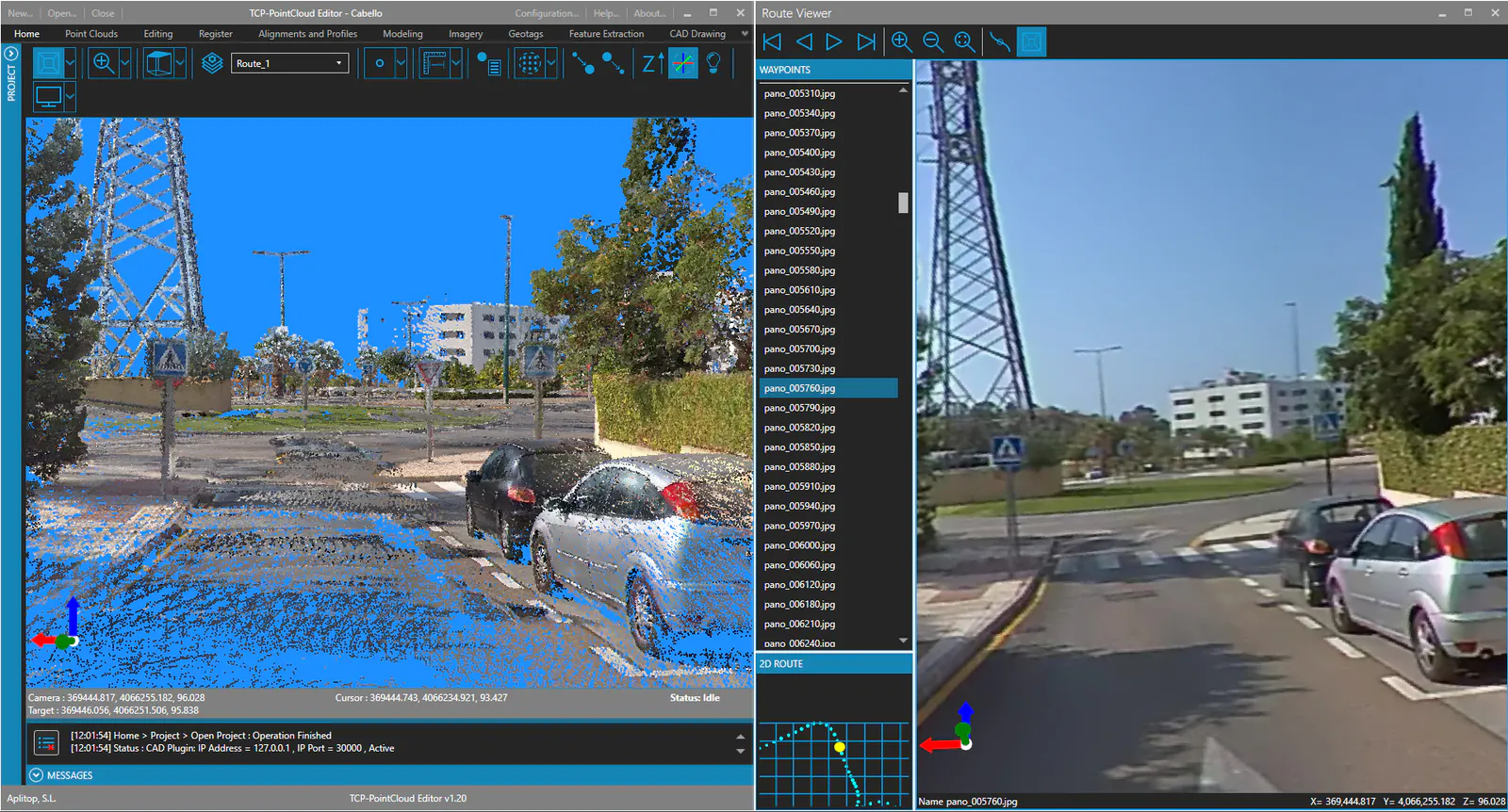
The Route Viewer has a toolbar that allows you to:
- Navigate by waypoints:
- First waypoint.
- Previous waypoint.
- Next waypoint.
-
Last waypoint.
-
Zoom (only for spherical images):
- Zoom in.
- Zoom out.
-
Normal zoom.
-
Main viewer synchronisation:
- Follow waypoint position.
- Waypoint viewpoint.
The WAYPOINTS panel at the top left contains a list of all the points on the route. The user can click on a waypoint in the list to view the image or images it contains in the viewer.
The 2D ROUTE panel at the bottom left is a diagram of the route. The user can scroll and zoom in on this map, and click on a point on the route to display the associated image.
The display area in the center shows the equirectangular (spherical) image or perspective images of the current route point. In equirectangular images, the user can zoom in and rotate the view using the numeric keypad and mouse.