
tcp PointCloud Editor
Fill - PCE
5.9 Fill
Location
- Ribbon menu
- Point Clouds
- POINT CLOUDS
- Fill
Description
This command creates a new point cloud by inserting regularly spaced points within a user-designated contour.
Parameters
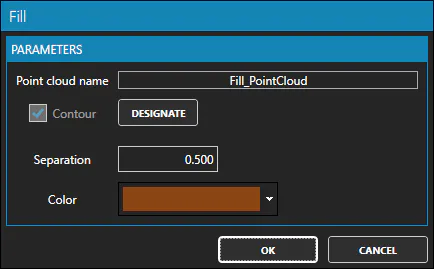
| Name | Meaning |
|---|---|
| Point Cloud Name | Name to be given to the new point cloud |
| Contour | Checked when a valid contour has been designated |
| Separation | Spacing between points in the new point cloud |
| Color | Solid color assigned to the new point cloud |
How to use
-
Set a name for the new point cloud.
-
Select the contour that defines the area where the new points will be inserted.
-
Set the spacing between the new points.
-
Set the color for the new point cloud.
Use cases
- When you do not have point clouds in an area (gap or hole) but you do have an outline of the area.
Remarks
-
The contour should be a closed polyline.
-
This command is only active when at least one contour exists in the drawing.