
tcp PointCloud Editor
Export point clouds - PCE
5.2 Export Point Clouds
Location
- Ribbon menu
- Point Clouds
- POINT CLOUDS
- Export (Export Point Clouds)
Description
This command allows the export of point clouds to files. The supported file formats are: * ASTM E57 (.e57)
-
LAS LiDAR (.las/.laz)
-
Polygon File Format (.ply)
-
Leica (.pts)
-
Aplitop ASCII Points (.pun)
-
Autodesk Recap (.rcs)
-
Text File (.txt)
-
XYZ Text file (.xyz)
This command is only active when at least one point cloud is selected in the point cloud panel of the project.
Details
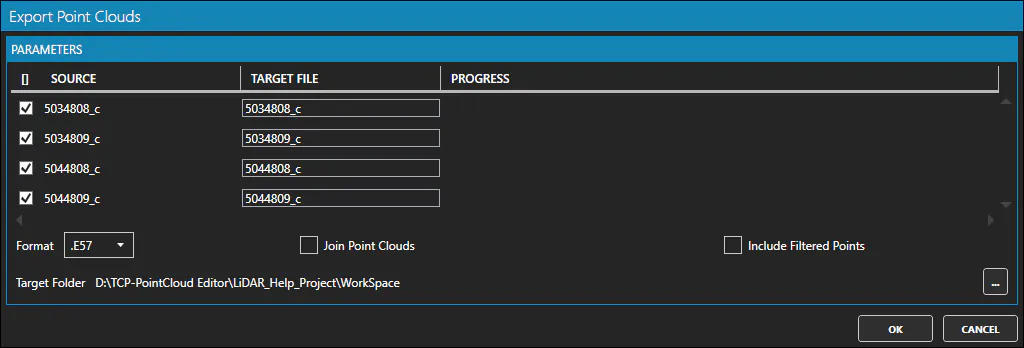
-
Target File: Set the target file name for each point cloud, when exporting multiple point clouds separately.
-
File Format drop-down list: Select the output file format.
-
Join Points Cloud option: Check to export all the point clouds in a single file.
-
Include Filtered Points option: Check to export also the filtered (hidden) points.
-
Target File: Set the target file path, when exporting a single point cloud.
-
Target Folder: Set the target folder path, when exporting multiple point clouds separately.
How to use
-
Select the output file format from the drop-down list.
-
Check the "Join Points Cloud" option to export all the point clouds in a single file.
-
Check hte "Include Filtered Points" if you want to export the filtered (hidden) points.
-
Set the target file name if you are exporting to a single file or set the file name of each point cloud and the target folder.
-
Clic the OK button to export the point clouds, or Cancel otherwise.