
tcp PointCloud Editor
Free 3D transformation - PCE
8.5 Free 3d Transformation
Location
- Ribbon menu
- Register
- TRANSFORMATION
- Free 3d Transformation
Description
This command displays the Free 3d Transformation dialog, where you can set the transformation parameters.
Details
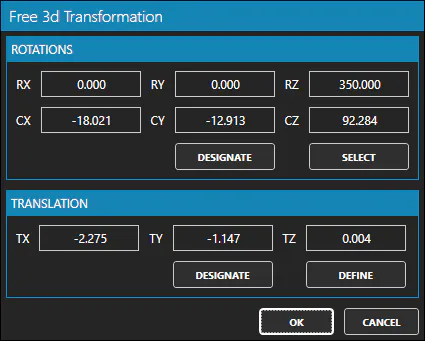
| Name | Meaning |
|---|---|
| RX | Rotation angle around X-axis in gons |
| RY | Rotation angle around Y-axis in gons |
| RZ | Rotation angle around Z-axis in gons |
| CX | X-coordinate of the rotation center |
| CY | Y-coordinate of the rotation center |
| CZ | Z-coordinate of the rotation center |
| TX | Translation in X-coordinate |
| TY | Translation in Y-coordinate |
| TZ | Translation in Z-coordinate |
How to use
-
Set the rotation parameters:
-
Rotation angles RX, RY and RZ, given in gons (1 gon = 1/400 of a full circle) in clockwise direction.
-
Center of rotation in X, Y and Z coordinates. You can designate the center of rotation in the 3d viewer, or select a control point.
- Set the translation parameters:
-
Translation distances TX, TY and TZ.
-
You can designate the translation vector in the 3d viewer, or define it by clicking two points.
-