
tcpGPS
Setting out modes - GPS v2
14.1 Setting out modes
When setting out, the reference to get the indications for reaching the points can be the north, the movement, the last staked out point or sun/shadow.
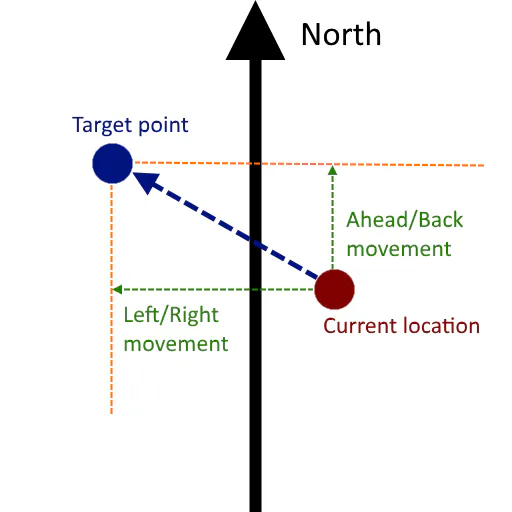
Setting out to the north
In this case the indications are referred to the north direction, so it is recommended to be oriented to the north when using this mode.
 |
|---|
Figure 123. Example of setting out to the north |
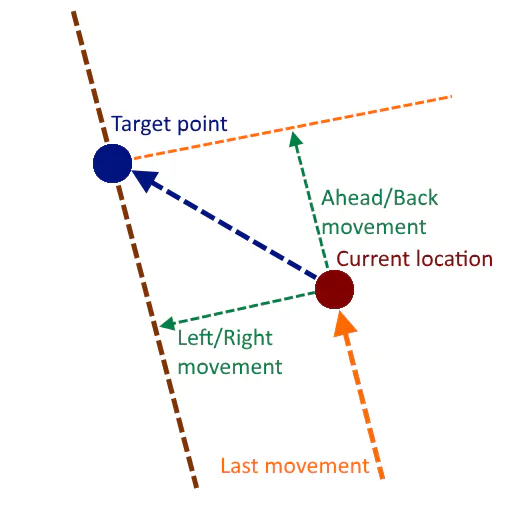
Setting out to the movement
In this case the last movement of the user is taken as reference for indicating the next movement he should do to reach the target point. In this mode, a new movement will be recognized when at least the location has change in 50 centimeters of distance.
 |
|---|
Figure 124. Example of setting out to the movement |
When the position reaches the limit configured settings named Target Mode Distance (see Configuring the workspace - GPS v2 ) the last move the user did is taken as reference and it does not change anymore, in order to avoid continuous changes due to the small distance to the point.
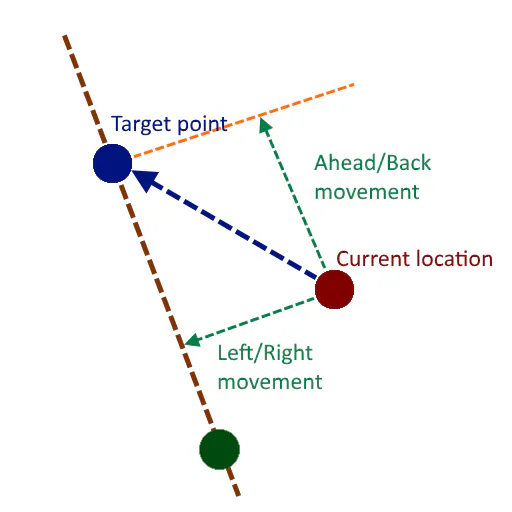
Setting out to the last point
In this case, the line from the last set out point to the target point is taken as reference.
 |
|---|
Figure 125. Example of setting out to the last point |
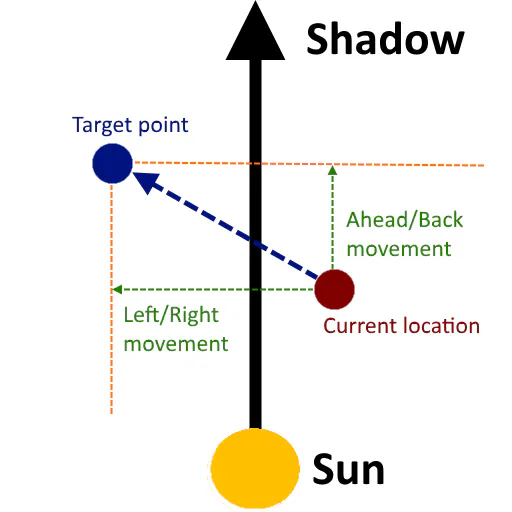
Setting out to the sun or shadow
This mode is like setting out to north, but in the case the reference is the sun. The user must have the sun at his back and a good guide is his own shadow.
 |
|---|
Figure 126. Setting out to the sun |
It is very important to know that the reference will change depending on the hour and the day.
When using stake out to the shadow the direction is the inverse, i. e., the user must leave the sun behind him to obtain the reference. In this mode, the cast shadow can be a great help when it comes to orienting himself.