
tcpMDT Photovoltaic
Quick profile - PV25
7.1 Quick Profile
This command is very useful for getting an idea of the terrain instantly. This command allows you to specify the line that defines the trace of the profile you want to obtain, simultaneously obtaining the position of the trackers.
Since the position of the trackers is going to be represented, it will initially ask us for the inclination in degrees of the photovoltaic panel for representation, then the study area and finally the trace of the selected profile with two points in the drawing.
Then the following window will appear where we can configure the characteristics of the profile drawing, for more details about this configuration, consult the TcpMDT manual in the Long Section chapter.
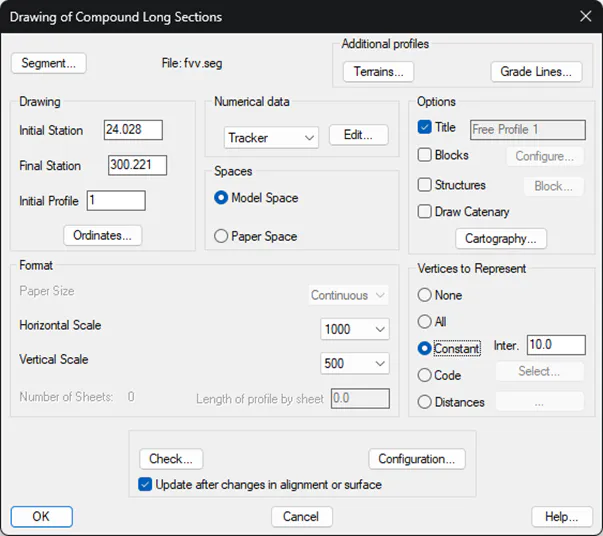
Finally, after pressing the "OK" button, it will ask us for a point on the screen for the profile drawing.
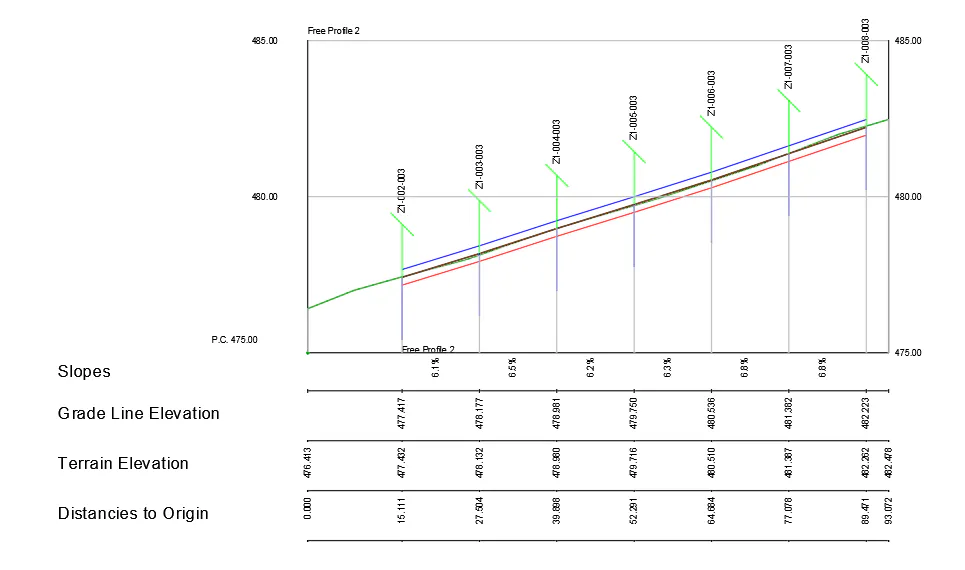
Each drawn tracker is identified with the name of the same, the grade and clearances established in the selected zone are also drawn.