
tcpMDT Photovoltaic
Check tracker - PV25
3.4 Check Tracker
With this option we will have the possibility to graphically visualize the characteristics of the tracker with the possibility of making any modification. Initially, it will graphically ask us for the tracker to review and then the following window will be displayed:
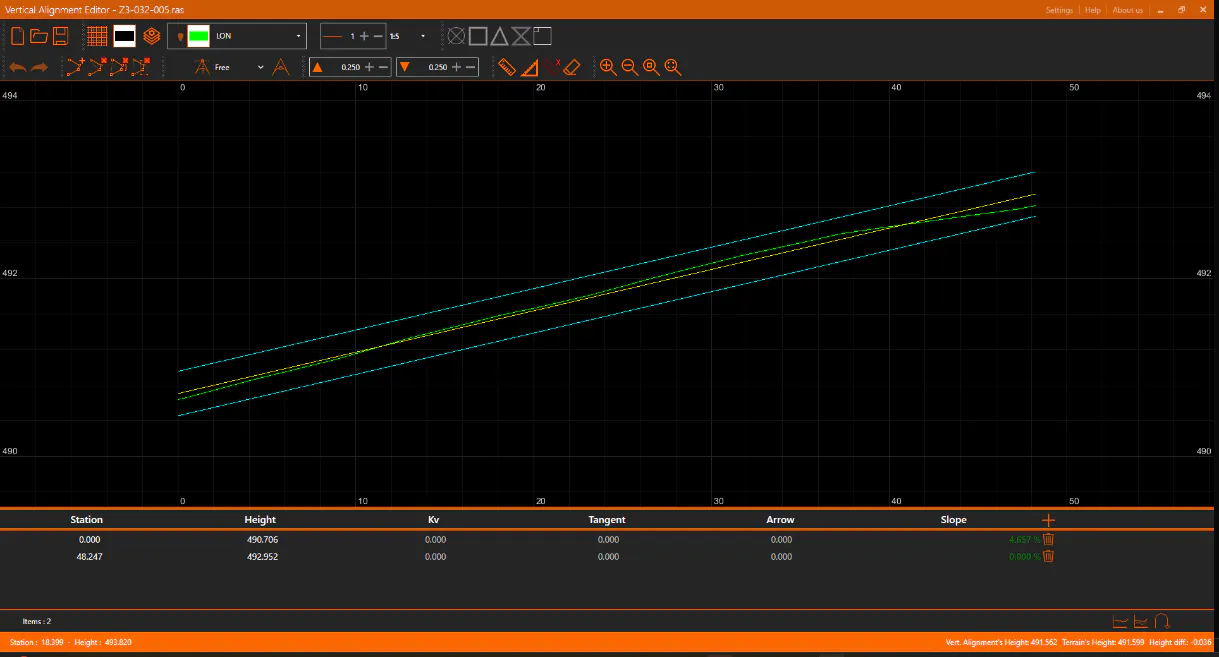
In this edition, graphically we can distinguish the following objects:
-
Green: The longitudinal profile that has been generated from the current surface.
-
Yellow: Tracker\'s level.
-
Blue: The positive and negative clearance.
We have the possibility to modify the level of the tracker both graphically and numerically in the list that appears at the bottom of the window.
The rest of the controls that appear in the upper area are described in detail in the "Review Cross-Sections" section within the Cross-Sections module.