
tcpMDT Photovoltaic
Edit tracker - PV25
3.3 Edit Tracker
This option will allow us to edit the characteristics of a tracker. When executing the command, it will ask us graphically to select it and then the following window will appear:
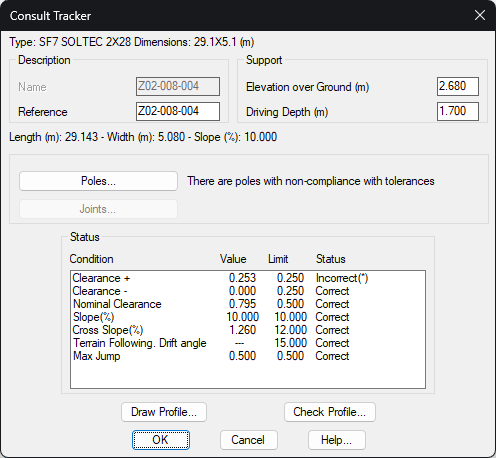
The header shows the type of tracker, as well as the dimensions of the tracker.
Description
Name: Name assigned to the tracker. This property is editable by the user.
Reference: Additional description to the name associated with the tracker.
Poles
Elevation over Ground (m): Ground height of all poles associated with the tracker.
Driving Depth (m): Length of the pole that will be placed under the ground.
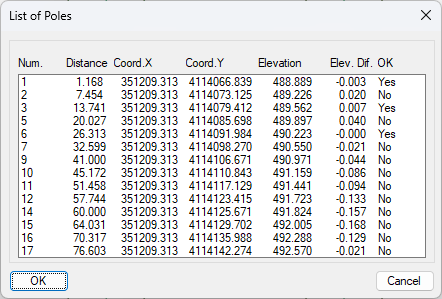
Poles...: Pressing this button will show a list with the coordinates of each of the tracker poles, as well as their compliance status.
-
Number
-
Distance: Distance to the origin of the tracker\'s initial coordinate.
-
X and Y coordinates.
-
Z coordinate: Elevation of the pole. This elevation corresponds to the elevation of the tracker\'s grade in the coordinates of the tracker.
-
Elev. Diff: The difference in elevation between the Z coordinate of the pole with respect to the current surface.
-
OK: Indicates whether the pole is within the restrictions established in the corresponding project and zone.
Joints...: In the case of editing a terrain following tracker, pressing this button will display the characteristics of the joints.
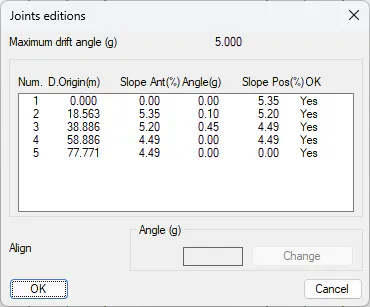
The list shows the swivel angles of each of the tracker joints, with the possibility of changing each of them.
In addition, it is shown whether each joint complies, i.e. if it is below the maximum angle of drift.
OK: A list that shows if it complies with the restrictions established in the project and the area to which it belongs.
-
Condition: Type of restriction.
-
Value: The value of the tracker in the corresponding constraint.
-
Limit: Reference value for the constraint.
-
Status: Meets or does not comply with the restrictions.
Draw Profile: With this option we have the possibility to draw the tracker in profile view. This function is described below in another section.
Check Profile: With this option we will be able to view the tracker in a separate window, with the possibility of modifying it graphically. This tool is described below.