
tcpMDT Photovoltaic
Insert trackers - PV25
3.1 Insert Trackers
This command will allow us to insert trackers individually. When you run it, the following window will appear in which you select the tracker to insert.
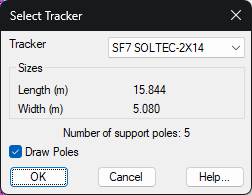
Tracker: Select the type of tracker to insert. This list will show the trackers defined in the tracker type library.
Sizes: The length and width of the selected tracker type are automatically displayed.
Draw Poles: If we check this box, the poles previously defined in the tracker type library will be drawn automatically.
Finally, it will ask us for the insertion point of the tracker to be inserted, the software will automatically check if the selected point is within a zone and if the tracker to be inserted does not intersect with any of the other existing trackers in the zone. In the event that it is not possible to insert it due to these restrictions, the corresponding warning will be displayed.