
tcpMDT
Smoothing - MDT25
6.13 Smoothing
The smoothing of contour lines may be applied when they are generated. However, in the case of very large and/or dense drawings, it is better not to work with smoothed contours since the size of the drawing increases. Performing this operation is more appropriate for the job's final presentation.
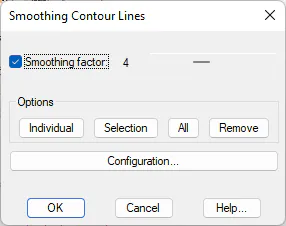
This operation may be configured by users through a variable factor ranging from 1 to 10. The options available are as follows:
-
Individual: Allows contour lines to be smoothed one by one. The result is shown at the moment they are selected graphically. This option allows the result of the different factors to be observed.
-
Selection: Allows a group of contour lines to be selected, so that smoothing factor chosen may be applied on them.
-
All: Smoothes all the contours in a single action.
-
Remove: Removes the smoothing of contour line.
By clicking on the Configuration button, the smoothing algorithm parameters may be specified (see Customization Manual).