
tcpMDT
Customize menus - MDT25
21.15 Customize Menus
Offers one the possibility of configuring the way the program's menu layouts are shown in AutoCAD.
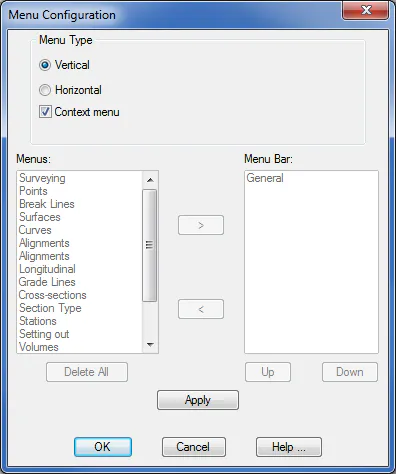
The Vertical option is active by default, which indicates that just one MDT menu appears on the AutoCAD toolbar, from which the other system menus drop down.
If the Horizontal option is selected, individual system menus can be chosen to appear on the AutoCAD toolbar. Thus, the main MDT menu is hidden and only the ones selected are shown.
Enable Context Menus: If this option is enabled, the context menus for MDT objects that are available will automatically be activated.
> Adds the menu selected from the Menus box to the Menu Bar box.
< Deletes the menu selected from the Menu Bar box.
Delete All: Deletes all menus from the Menu Bar box.
Up: Moves up one position in the Menu Bar box.
Down: Moves down one position in the Menu Bar box.
Apply: Updates the AutoCAD menu bar with the changes made.