Support
Add Comments and Attachments
Continue the conversation by adding comments to your ticket. Attach documents or files needed to facilitate a faster resolution.
Below the comments box, you will find a text area where you can write a comment to submit about the issue:

If you need to attach a file, click the clip icon located on the left side of the text area. You can attach all types of files, but keep in mind that only one file can be attached at a time and it must be smaller than 5 MB. If you need to send more than one file, compress them into a ".zip" file. If the file exceeds 5 MB, upload it to a cloud service such as Google Drive, Dropbox, WeTransfer, OneDrive or similar platforms, and share the link. Once your comment and attachments are ready, click the send button on the right side to submit them.
If you attach a file, it will appear as shown below:

Within the comments section, you can view the attachments submitted by both you and our agents:
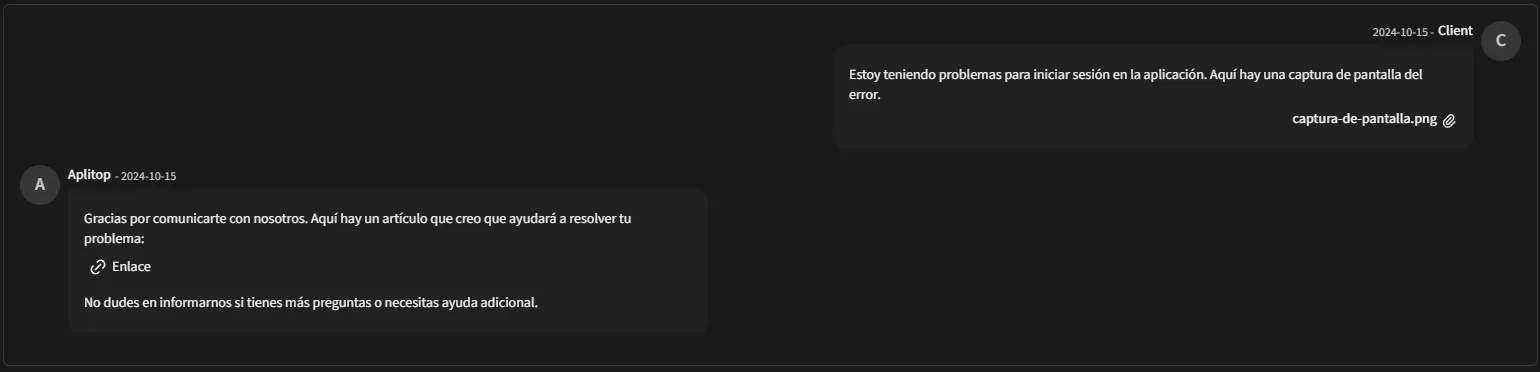
Each attached file is displayed with its name and a clip icon, indicating that the file can be downloaded by clicking on the icon.