
tcpMDT Photovoltaic
Change cross slope - PV25
6.12 Change Cross Slope
With this option we will have the possibility to change the cross slope between the trackers, when we execute this option, the following window will appear in which we will be able to configure the way of action.
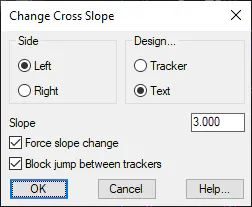
Design: Indicate whether to change the slope of the tracker, we are going to select the tracker or the text of the slope.
In the case of selecting the tracker, the cross slope of the selected side will be modified.
If the text is selected, the slope of the selected text will be modified.
Side: Once the slope change has been applied, the side indicates the tracker to be modified from the slope entered.
Slope: Value of the slope to be entered. The sign is considered.
Force Slope Change: If this option is not enabled, the slope will only be changed if the existing slope is greater than the new slope you want to insert. Otherwise, if it is activated, the new slope will always apply.
Block Jump Between Trackers: In the event that this option is activated, the tracker next to the south or north, depending on the closest, will also change its elevation to maintain the existing jump between the two.