
tcpMDT Photovoltaic
Change slope tracker - PV25
6.11 Change Slope Tracker
With this command we will be able to apply a certain slope to the selected tracker. Initially, the following window will appear in which we will establish how the slope change is going to be made.
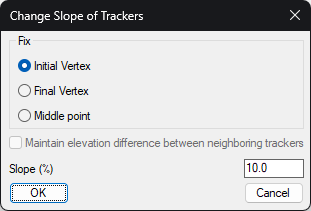
Fix: Indicate at which point of the tracker the new slope is to be applied.
-
Initial vertex: Set the elevation of the initial vertex of the tracker.
-
End vertex: Set the elevation of the final vertex of the tracker.
-
Middle point: In this case we set the elevation of the midpoint of the tracker, this option has the particularity that, if we activate the box "Maintain elevation difference between neighboring trackers", a change of elevation will be applied to the trackers that are to the north and south of the selected tracker in order to maintain the difference in elevation between the trackers.
Slope: Value of the slope to be applied to the tracker. The sign of the slope is considered.