
tcpMDT
[PRO] define section - MDT25
14.23 [PRO] Define Section

This option will allow us to define the section of a trench with the associated pipe, so that in the following commands we can both draw and locate it.
When executing the command, the program will initially ask us for the file where the data related to the position of the pipe and the different materials to be filled will be stored (extension . TUB).
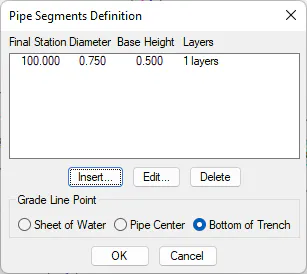
Point of application of the grade
We can indicate the point where the elevation of grade is applied. We have three possibilities:
-
Sheet of Water: The elevation of grade goes at the point of support of the pipe on the ground.
-
Pipe Center: The elevation of grade is applied on the geometric center of the pipe.
-
Bottom of Trench: The grade elevation is applied at the base of the trench.
Reports
The configuration of the pipe by stations and the different materials between each interval will be introduced. When inserting or editing, the following window will appear where these parameters will be configured.
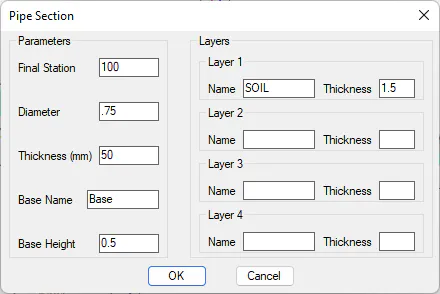
Final Station: Station to which we define the pipe section.
Diameter: Diameter of the pipe.
Thickness (mm): Thickness of the pipe. This parameter affects the measurements.
Base Name: Name of the pipe bed material. It will be reflected in the area and volume report.
Base Height: Vertical distance between the bottom of the trench and the fulcrum of the pipe (water sheet).
Layers
We define the different strata of land with which we are going to fill the trench. You can introduce up to a maximum of 4 types of land, specifying the name and thickness of it. Land thicknesses are counted from base height.