
tcpTunnel CAD
Edit axis node - TNC3
12.5 Edit Axis Node
This dialog appears when performing insertions or modifications to the definition of the segments of the active axis.
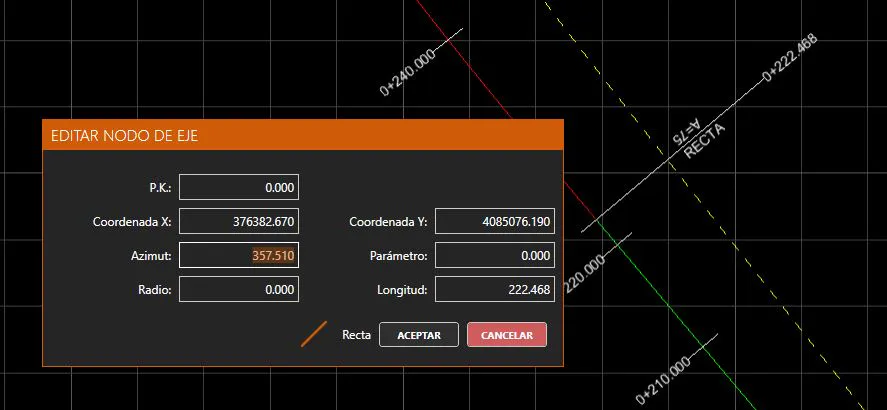
Station: The initial station of the segment. Can be edited on the first segment.
X Coordinate: The initial X coordinate of the segment. Can be edited on the first segment.
Y Coordinate: The initial Y coordinate of the segment. Can be edited on the first segment.
Azimuth: The initial azimuth of the segment. Cannot be edited if the segment is preceded by a curve or clothoid.
Parameter: In the case of clothoids, the value of the parameter (A). Otherwise always 0. Always editable.
Radius: In the case of curves or clothoids, the value of the radius. Otherwise always 0. The sign determines whether the curve is interior or exterior. Always editable. When it is an exit clothoid, if the parameter is non-zero and the radius is zero, the clothoid will automatically be interpreted as having the same radius as the preceding curve, so if that curve's radius is modified, the clothoid will automatically readjust.
Length: Length of the segment. Editable, unless a clothoid with a non-zero radius is being defined.
Next to the accept button, the alignment type of the segment is shown; this is deduced from its definition: straight if radius and parameter are zero, curve if parameter is zero but radius is non-zero, and clothoid if parameter is non-zero.
At all times a preview of the modified axis is shown as a yellow dashed line in the viewer. Modifications can be seen in real time as they affect the axis.