
tcpTunnel CAD
Introduction - TNC3
12.1 Introduction
This application allows one to view axis files (EJE), convert LandXml axes (xml) and perform fine adjustments using the editing tools provided by the application.
Once the application is launched, the interface will be displayed.
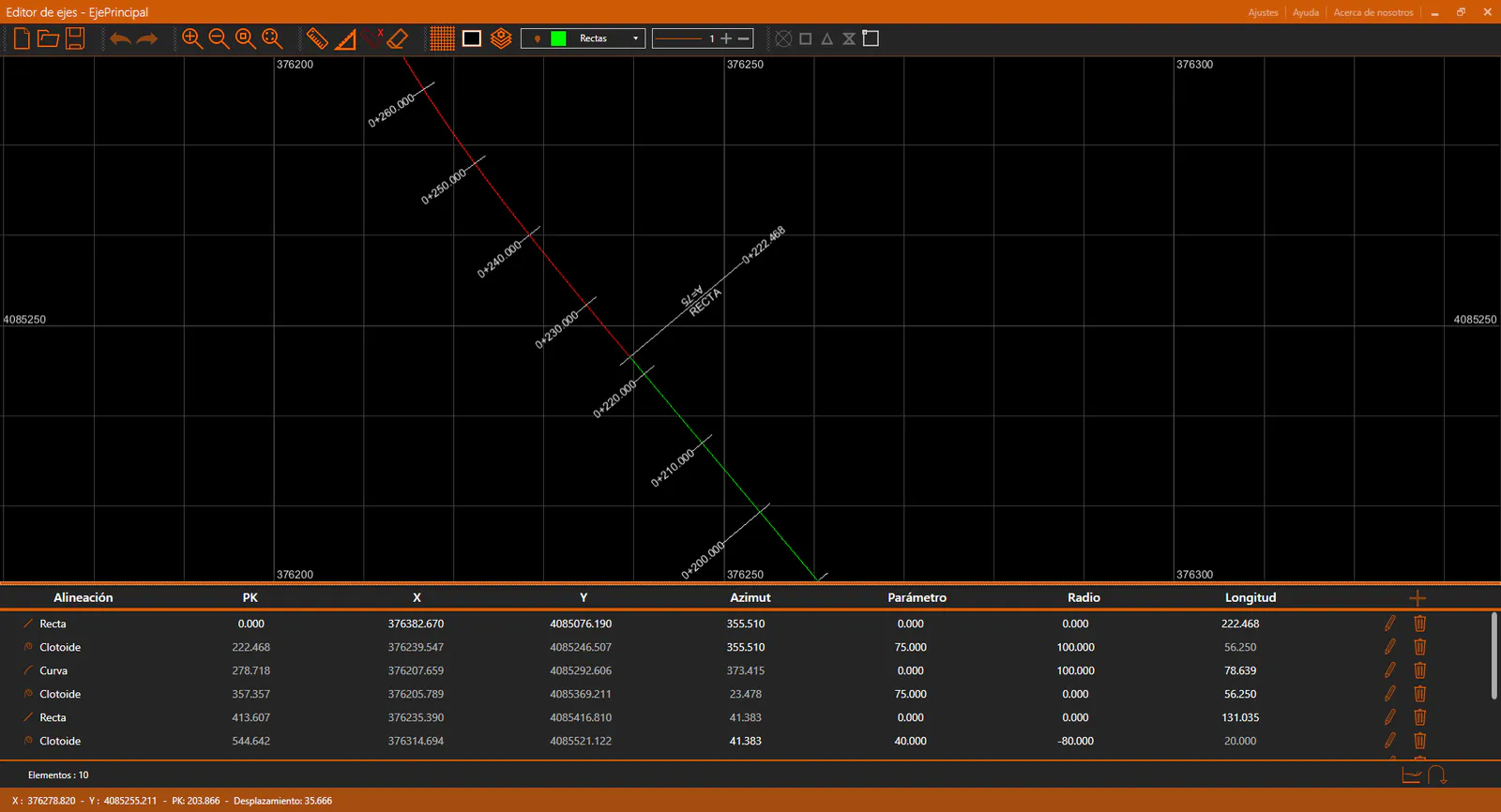
The following sections can be distinguished at a glance:
Title bar: At the top, the bar with an orange background. The application title appears on the left. On the right there are some options: Settings, Help and About. Further to the right are the typical Windows controls: minimize, restore/maximize and close.
Toolbar: Just below the title bar. Allows one to control the viewer state and access the different editing tools.
CAD Viewer: The application provides a CAD viewer in which axes are represented with their annotations, as well as any measurements performed using the measurement tools.
Axis Panel: Below the CAD viewer, a panel with the active axis information.
Status bar: At the bottom of the window, the bar with an orange background. Provides general information such as: cursor coordinates in the drawing, the station and offset of those coordinates relative to the axis, and information messages during editing commands.