
tcp PointCloud Editor
Connect to CAD - PCE
13.40 Connect to CAD
Location
- Ribbon menu
- CAD Drawing
- EXTERNAL CAD
- Connect (Connect to CAD)
Description
This command establishes a communication channel between TCP-PointCloud Editor and a compatible CAD application. Actually, the compatible CAD applications are AutoCAD, BricsCAD, ZWCAD and GStarCAD.
The command is a toggle. If the connection is already established, the command will disconnect the two applications.
Parameters
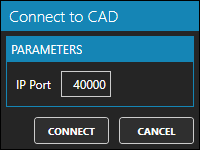
| Name | Meaning |
|---|---|
| IP Port | The port number used for communication. The default value is 40000 |
Remarks
- Refer to the text output of the CAD application, to determine which port it is listening on.