
tcp PointCloud Editor
Elevate polylines - PCE
13.19 Elevate Polylines
Location
- Ribbon menu
- CAD Drawing
- EDIT 3D
- Height
- Elevate (Elevate Polyline)
Description
This command converts arcs, lines, 2d and 3d polylines into 3d polylines, setting the Z-value of the vertices equal to the Z value of: * The nearest point cloud point in XY.
-
The given Grid in that XY.
-
The given Surface in that XY.
-
The given profile closest vertex.
Parameters
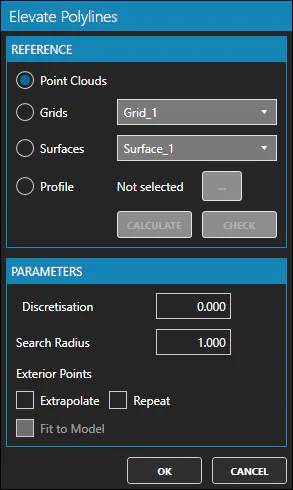
| Name | Meaning |
|---|---|
| Reference | May be Point Clouds, Grids, Surfaces or Profile |
| Discretisation | Vertex interpolation distance. Set to 0, for no interpolation |
| Search Radius | XY search distance of a value for Z (profile vertex or point cloud point) |
| Exterior Points | May be Extrapolate or Repeat and Fit to Model, to indicate how assign height values to outer points |
Remarks
- The Z value for each vertex will be always the Z value of the closest reference element in XY.