
tcp PointCloud Editor
Simplify polyline - PCE
13.24 Simplify Polyline
Location
- Ribbon menu
- CAD Drawing
- EDIT 3D
- Geometry
- Simplify (Simplify Polyline)
Description
This command simplifies 2d and 3d polylines by removing vertices.
The elimination of vertices can be done on the basis of the distance between vertices or the angle difference between consecutive segments.
Parameters
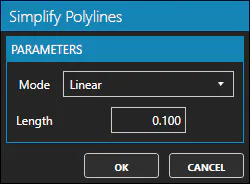
| Name | Meaning |
|---|---|
| Mode | May be Linear or Angular |
| Length | Available when Mode is Linear. Segments shorter than this value will be deleted. |
| Angle Threshold | Available when Mode is Angular. Consecutive segments forming angles less than this value shall be converted into a single segment. |
How to use
-
Select one or many polylines.
-
Set the Mode to "Linear" or "Angular".
-
Set the "Length" if "Linear" mode is selected, or the "Angle Threshold" if "Angular" mode is selected.
-
Click OK to proceed with the simplification, or CANCEL to cancel the command.
Remarks
- Starting and end points will be kept.