
tcp PointCloud Editor
Rectify polylines - PCE
13.20 Rectify Polylines
Location
- Ribbon menu
- CAD Drawing
- EDIT 3D
- Height
- Rectify (Rectify Polyline)
Description
This command sets the value of the Z component of each vertex of the selected polylines to the Z value of the higher or lower point cloud point in a XY radius.
Parameters
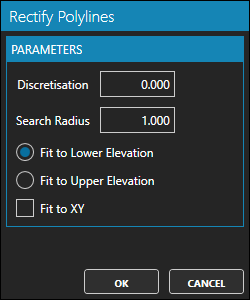
| Name | Meaning |
|---|---|
| Discretisation | Vertex interpolation distance. Set to 0, for no interpolation |
| Search Radius | XY search distance of a value for Z in the point clouds |
| Fit to Lower Elevation | Check to assign the Z value of the lower point to each vertex in its XY neighbourhood |
| Fit to Upper Elevation | Check to assign the Z value of the upper point to each vertex in its XY neighbourhood |
| Fit to XY | Check to assign also the X and Y values of the point to each vertex |
Use cases
- When drawing the lower or upper edge of a continuous element.