
tcp PointCloud Editor
Parallel offset polylines - PCE
13.29 Parallel Offset Polylines
Location
- Ribbon menu
- CAD Drawing
- MODIFY
- Parallel (Parallel Polyline)
Description
This command creates a 3d polyline parallel to a given 3d polyline.
Parameters
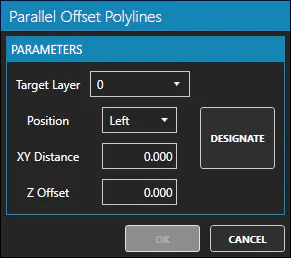
| Name | Meaning |
|---|---|
| Target Layer | Destination layer for the new 3d polyline |
| Position | May be Left or Right respect to the source polyline |
| XY Distance | Distance in XY. Separation in XY between source and parallel polylines |
| Z Offset | Offset in Z. Separation in Z between source and parallel polylines |
How to use
-
Select one 3d polyline.
-
Click on the Parallel button.
-
Set the parameters according to your needs.
Remarks
- You can create a parallel polyline with only Z-offset, setting XY Distance to 0.