
tcp PointCloud Editor
Screenshot - PCE
11.9 Screenshot
Location
- Ribbon menu
- Imagery
- TOOLS
- Capture (Screenshot)
Description
This command captures the image currently displayed in the application's 3d viewer.
Parameters
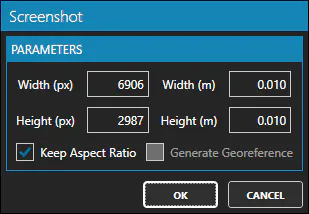
| Name | Meaning |
|---|---|
| Width (px) | The width of the image in pixels |
| Height (px) | The height of the image in pixels |
| Width (m) | The width of the image in meters |
| Height (m) | The height of the image in meters |
| Keep Aspect Ratio | If checked, the aspect ratio of the image will be kept |
| Generate Georeference | If checked, the image will be georeferenced |
How to use
-
Set the width and height of the image in pixels or the pixel width and height in meters.
-
Check whether you want to keep the aspect ratio of the image.
-
Check whether you want to generate a georeferenced image.
-
When you click the OK button, you will be prompted to specify a file to save the image to. (PNG and JPG formats are supported).
Remarks
- Generate Georeference is only available if the 3d viewer is in top view.