
tcp PointCloud Editor
Import spherical imagery - PCE
11.4 Import Spherical Imagery
Location
- Ribbon menu
- Imagery
- IMAGES
- Import (Import Spherical Imagery)
Description
This command allows you to import a set of spherical images given a image orientations file in CSV format an a folder containing image files.
Each image will be linked to a point cloud in the project (if it exists), by name matching.
Once the image orientations file and the images folder have been specified, the Import Spherical Imagery window will display the content found. You can manually link or unlink the images to the project's point clouds, using the combo boxes in the right column.
Details
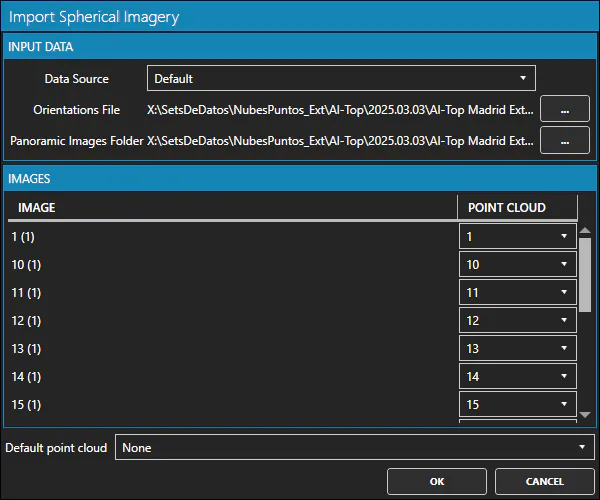
In the dialog box, you must set the data source (Default, OmniSLAM or XGRIDS), select the CSV file containing the image orientations and the folder containing the images. Use the buttons to browse for the file and folder.
The default image orientations file must be a CSV file with the following columns: - Image file name with extension - X coordinate - Y coordinate - Z coordinate - Quaternion X - Quaternion Y - Quaternion Z - Quaternion W
The quaternion must correspond to a transformation of the camera's local coordinate system into world coordinates. For the default data source, it is assumed that the local coordinate system of the camera is of the form: - X-axis: forward - Y-axis: to the left - Z-axis: upwards