
tcpMDT
[PRO] Change Scale - MDT26

Change Scale
 | Command to execute in the CAD |
|---|---|
Vertical menu | MDT26 > Control Points > Change Scale |
Ribbon menu | Setout > Control Points > Change Scale |
Command line |
This command allows one to change the representation size on the drawing of the control points. Apart from this, the Points > Change > Change Scale command also allows one to set the control points' scale along with the points' scale.
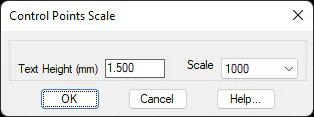
Attribute height can be changed in the dialog box using the Text Height box. When the drop-down list is modified using Scale, the program recalculates text size.