
tcpMDT
[PRO] Delete Control Points - MDT26

Delete Control Points
 | Command to execute in the CAD |
|---|---|
Vertical menu | MDT26 > Control Points > Delete Control Points |
Ribbon menu | Setout > Control Points > Delete |
Command line |
This tool enables one to delete setting out control points inserted in the drawing. To do so, the following dialog box appears once the command has been run, where the control points one wishes to delete should be marked.
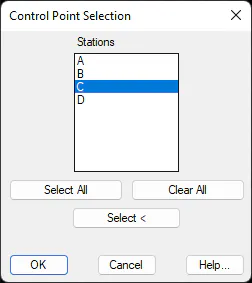
The way this dialog box works is basic, that is to say, one can either select all the control points (Select All button) or choose them manually (Select button). Once the dialog box has been validated, the control points selected will be deleted.