
tcpMDT
[PRO] Edit Control Point - MDT26

Edit Control Point
 | Command to execute in the CAD |
|---|---|
Vertical menu | MDT26 > Control Points > Edit Control Point |
Ribbon menu | Setout > Control Points > Edit |
Command line |
This option allows us to modify the features of any setting out control point drawn in the current file. In order to execute it, it is necessary for defined control points to exist on the drawing. Otherwise, the message "ERROR: There are no defined control points" is displayed.
MDT requests the control point to be selected by designating any element belonging to the block or its attributes. If another object is selected, the message "ERROR: Not a control point" is displayed.
Once selected, a dialog box appears on screen which is described below:
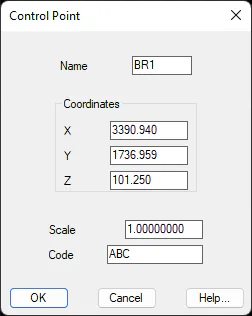
Name: Name of the control point selected.
Coordinates: Coordinates of the selected control point's location.
Scale: The anamorphosis of the control point.
Code: The control point's descriptive code.
Once any of these fields has been modified, the changes are updated when the dialog box is validated, and the control point is redrawn. If the control point's name is changed to that of another already existing control point, the program will prevent the operation from being confirmed, showing the message "ERROR: Existing control point".