
tcpMDT
Transform Points - MDT26
 | Command to execute in the CAD |
|---|---|
Vertical menu | MDT26 > Coordinate Systems > Transform Points |
Ribbon menu | Surveying > Coordinate Systems > Transform Points |
Command line |
Transform Points
This command allows you to apply a transformation to the points in the current drawing. First request an NTR file, and then the following dialog is displayed:
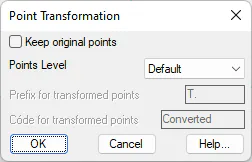
Keep the original points. If this option is disabled, the transformation will be applied to existing points. On the contrary, if this box is activated, the new points will be maintained and new transformed points will also be created, with the parameters indicated in the following controls.
Points level. The level at which the new transformed points will be created.
Prefix for transformed points. To avoid conflicts between existing and transformed points, a prefix should be indicated for the new points, so that the original point 1 becomes T.1, the original point 2 becomes T.2, and so on.
Code for transformed points. Code that is assigned to the new transformed points.