
Support
How do I verify which protection is installed in my software?
How do I verify which protection is installed in my software?
Detailed
You can verify the type of protection installed directly from the MDT software to confirm that it matches the protection supplied to you.
Answer
Verify from MDT
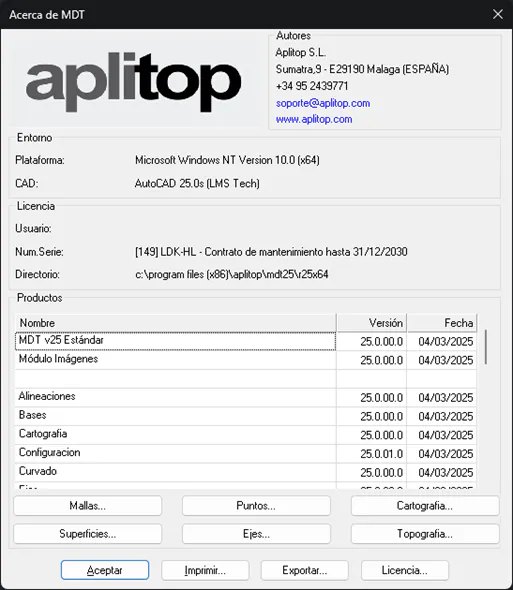
- Run MDT > ABOUT Tcp-MDT
- The serial number will appear in brackets in the dialog (Example: [149])
- The protection type will also be displayed
Protection Codes
| Code | Hardware/Software | Technology | Single-user/Network |
|---|---|---|---|
| LDK - SL | Software | LDK | Single-user or Network |
| LDK - HL | Hardware | LDK | Single-user or Network |
| SP | Hardware | Sentinel | Single-user |
| SPN | Hardware | Sentinel | Network |
Example
In the Top image: - Serial number: 149 - Protection type: LDK - HL (Hardware with LDK technology)
First button...
⚠️ If an exclamation mark (!) appears after the serial number, it indicates that you have installed a version of MDT higher than the one purchased. Contact the Administration Department.

Cross-check
Compare this information with the type of protection supplied to you. See: FAQ-01: How do I determine my protection type?
Category: General Information Applicable to: All protection systems Classify points by levels: Basic