
Support
How to verify and update the Sentinel driver version?
How to verify and update the Sentinel driver version?
Detailed
An outdated or corrupt driver may prevent MDT from recognizing the protection key.
Applicable to
Hardware protection system with Sentinel technology
Step 1: Verify current version
Open the FOLDER:
C:\Archivos de programa (x86)\Aplitop\MDT25\DriverRun USBDiag.exe
A Window will appear with the key information:
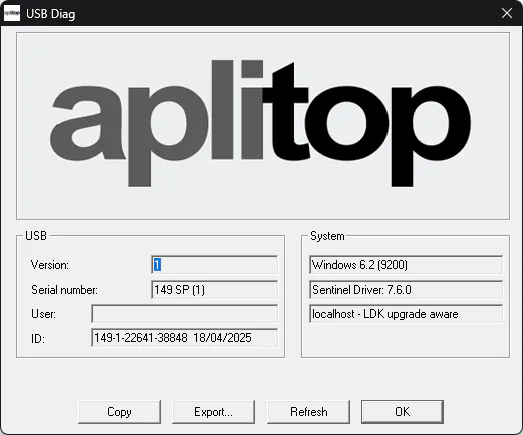
Note down: The displayed information (serial number, Version, etc.)
Step 2: Reinstall the driver
Preparation
Disconnect the key from the USB port
Close MDT if it is open
Close USBDiag if it is open
Finish
In the same Driver FOLDER, run Setup.exe
Follow the steps in the installation wizard
Accept the terms and conditions
Wait for the installation to complete
Post-installation
Connect the key to the USB port
If Windows requests a Reset: Reset the INSTRUMENT
If no Reset is requested: You can proceed Directly
Step 3: Verify operation
Run USBDiag.exe again
Verify that it now displays correct information
Try to Open MDT and execute a command
Troubleshooting
The driver does not install
Possible causes: - Insufficient permissions - Antivirus blocking - Corrupt driver
Solution: 1. Run Setup.exe as Administrator (right-click → Run as administrator) 2. Temporarily disable the antivirus 3. If it persists: Contact Technical Support
MDT still does not recognize the key
If the problem continues after reinstalling the driver: - FAQ-13: Check key Status - FAQ-14: Verify the Sentinel service
How often should I Update the driver?
📅 Recommendation: - When you install a New Version of MDT - If protection Warnings appear - Every 6-12 months as preventive maintenance - After Updating Windows
Driver Versions
Version | Compatible with | Notes |
|---|---|---|
7.x | MDT up to v8 | Obsolete |
9.x | MDT v9+ | Update |
10.13+ | MDT v25+ | Latest Version |
Category: Troubleshooting - Maintenance Level: Intermediate TOOLS: Setup.exe, USBDiag.exe Frequency: As needed